Showing posts with label spellcheck. Show all posts

18 March 2009

CSUN 2009 - Writing Tools - Supporting All Writers

(As the CSUN 2009 - Technology and Persons with Disabilities Conference goes on I will post my three presentations and add short posts about what I see and hear. You may want to also follow the CSUN Twitter feed at #csun09)


If you could offer your students technologies which would support their writing skills, and could do it for free, would you?


Suppose your students could slip past small muscle control issues to begin getting their thoughts onto “paper?” Or that they could read and edit their words without struggling with decoding? Or could effectively spellcheck their own work no matter how much accent or first-languages impacted their initial spelling attempts?


What if you could watch – and support – your students as they wrote collaboratively, while tracking every change? Or if students could collaborate on homework without being in the same neighborhood? Or could track and record sources without the difficulty of writing complicated notes?


slideshare powerpoint has links if you download


When Englert, Manalo, and Zhao wrote I Can Do It Better on the Computer: The Effects of Technology-enabled Scaffolding on Young Writers' Composition, documenting the success of computer supports in 2004 most of the solutions studied had to be purchased by schools and students. Today free downloadable and online software allow us to offer every student technology which can improve the core elements of their writing: spelling, organization, editing, and understanding of authorial voice.


Text-To-Speech systems allow students to independently listen to their own writing while editing, even if they are weak readers. This not only helps them to identify wrong words, repeated words, and omitted words, it offers a way for them to compare their phrasing, descriptions, and explanations with their intentions and their aspirations.


Content-based spell-checking with word definitions allows struggling readers and writers of English to find the right word and the right spelling without losing their thoughts during long, frustrating trips to a print dictionary.


Online document software allows peer collaboration and teacher support of the writing process.


And online graphic organization tools and notebooking systems support writing organization.


Up to two years worth of functional research with WordTalk, Firefox with CLiCk-Speak (and other add-on tools), Ghotit, Google Docs, Google Notebook, Webspiration, and Microsoft Vista’s Speech Recognition in both educational and job training situations underlie this presentation which will look at best practices for using these free tools across student environments.


Particular emphasis will be placed on how to combine these tools to support the writing process, focusing on carrying students from engagement through persistence to editing and production for audience, all with software that is already on most school computers or which can be accessed at no cost.


These are the critical issues in creating and supporting emerging writers. Students must have ways to begin writing which do not generate massive frustration. They must have ways to complete writing which do not exceed their ability to persist in the task. They must have effect ways to edit even if their reading decoding skills are week. And they must discover that writing has a purpose beyond teacher-defined school success: without this feedback, engagement and persistence will inevitably wane.


In their 2004 article Englet, Manalo, and Zhao state, “Without access to these functions, the memory or cognition of a problem solver might be overwhelmed (Pea, 1993; Stone, 1998). In this manner, technology serves as a type of social actor or intellectual partner. Together the individual-operating-with-the-mediational-technology can participate in a process that, barring this support, might lie beyond his or her attainment. (Pea, 1993; Salomon, 1993; Wertsch, 1998).” Five years later we can provide this functional support on any internet-connected computer, and on many “smart” mobile phones. Offering our students the opportunity to use their cognitive efforts for the learning of writing skills, rather than overcoming capability differences.


- Ira Socol in Los Angeles


Englert, C.S., Manalo, M., Zhao, Y. (2004) I Can Do It Better on the Computer: The Effects of Technology-enabled Scaffolding on Young Writers' Composition. Journal of Special Education Technology. Volume 19 Number 1.

14 May 2008

Seven Simple Solutions - but first - a story

It's nice out, and I'm tired of being inside and being angry. The philosophy of education can make my head hurt. And so can the low expectations of supposed liberals with limited agendas for change. So let me tell a short story first, and then repeat a few simple ways to begin changing possibilities.

in a city in Michigan


They come up to me, afterwards, and begin to ask all the questions they will not ask in front of others - not in front of their friends, surely not in front of their teachers. "I want to be..." they begin, or, "I want to go..." or, "I want to do..." and then, "How can I?" or, "Is there a way?" or, "Is there anything that can help me?"

These children have been in school in America - that most powerful nation on earth - that wealthiest of societies - that preacher of equality of opportunity - they have been in school in America for over ten or eleven or even twelve years, and they have received nothing but a list of their limitations. Every day they are measured by the ways that they cannot be exactly like their teachers or those who rule the nation. They cannot hear the same way. they cannot see the same way. They cannot walk the same way, or read the same way, or understand the same way. They might simply not be able to sit still the same way, or they may have been born into a culture that does not see the universe exactly in the same terms that Protestant White people do. And so, in ten, or eleven, or even twelve years they have received nothing but a list of their limitations.

"I want to be a pilot," a boy named Saddam says. "I have been getting flight time with the father of a friend, I am getting very good, I have landed the plane myself already, but I cannot read the Ground School books." I tell him we can get him software that can read these technical books to him. I give him the name of the software. I give him copies of my card and tell him to have both his school teacher and the Ground School to get in touch with me. And I work hard not to say the other things - that this software has been easily available for a dozen years, longer than he has been in school, but those in charge of his education have been too lazy and careless to get it for him. And I do not say that sadly, this third generation American from the heartland of American industrial democracy will have a hard time getting a pilot's job no matter what because probably half of Americans are too stupid to separate this boy's name and religion from their prejudices.

"I have this phone," another boys asks, through a Sign Language interpretor. He holds up a smartphone, the basic lifetool for the deaf in the 21st Century. "Can I get the school to let me use it in school and to unblock their computers so teachers can text message stuff to me?" And I suggest how he and his parents might argue for this. I send him links to the law, my computer to his phone. We talk by text for twenty minutes. I do not say that American institutions of secondary education - like the prisons they most closely resemble - are far more concerned with control and security than anyone's learning - especially his.

"The electric door on the cafeteria broke last year and they say they're still trying to fix it, and I can't get to the bathroom without announcing it and asking friends for help." Again, I bring up the law, and I quickly look up a local advocacy group and recommend it. But I don't say that I am quite sure that if the football stadium's scoreboard broke, it would be fixed immediately, and so would the superintendent of school's laptop, and it is
simply that this young women counts for less than others in her community.

"They told me that I couldn't become a paramedic because they wouldn't let me have a reader on the certification test." And all I can say is that, unless things change where he lives, that he may have to cross state lines to a "higher rights" state, or cross the border, which really is not far, and go to a more progressive nation. "Don't let being born here," I tell him, "stop you."

But I know that being born here can stop kids. It can stop them cold. It can stop them dead. America since the e
lection of Ronald Reagan has fallen completely out of the top twenty major nations in social mobility. If you are born poor you will be poor. If you are born with a disability you will be uneducated and you will be poor. If your parents have not been to college you will not finish college. If you are born to the wrong zip code there is a 95% chance that you will never succeed, if you even manage to live to age eighteen.

And while the United States has become a place of inherited wealth and privilege it has ratcheted up the myths of opportunity, thus blaming the poor, the disabled, and those whom prejudice traps for the results of cruel government policy that robs from the poor to enrich those who already have so much.

But I cannot say any of that right here. The people who have invited me are lovely. They are all on the right side. Thi
s is not the place to begin a revolution. Those who make the rules that have crushed these children - they are not here. They are not listening. They are too busy handing their money to politicians who will guarantee the future of their tax breaks, too busy buying huge televisions and expensive cars, too busy making sure that neither their kitchen nor their bathrooms look anything but up-to-date. With all that to take care of, they have nothing to share with kids in need.

story copyright 2007-2008 by Ira Socol


Seven Simple Solutions (we have to start somewhere)

Not to make the whole day depressing. Let me repeat a few simple solutions to the most common struggles I see among all kids in schools. Free solutions, and - yes, just so you can start a fight at your local school by quoting me - if your school does not have all these installed and/or linked on every computer - they are guilty of educational malpractice. They are guilty of deciding that access is not important. They are guilty of intentionally leaving children behind.

No school official should ever be allowed to complain about the cost of accommodations until all the free stuff is installed everywhere in the school. If they start to complain, just tell them to shut up and start downloading.

CLiCk-Speak

The Firefox Add-On from Charles L. Chen that makes text on-line accessible to almost every LD student and supports sight-word development. The brilliant simplicity of the three button toolbar, which can fit write into the Firefox bookmark bar or be presented larger separately, allows it to work for students with a very wide range of skills. When combined with Google Docs this system can even allow students to hear their own writing read back to them.

WordTalk

A wonderful new tool offering free text-to-speech within Microsoft Word. Stunningly simple to use. Again, not just a reading support, but a writing support as well. (Thanks to the CALL Centre)

Ghotit

The spellcheck system that most of us need, ghotit.com actually helps to fix the types of spelling and word errors most students - especially dyslexics and English Language Learners - make. It indicates misspelled words and misused words and links corrections to definitions. All you need is a link in your bookmark bar to give your students a real chance at spelling and correct word use.

PowerTalk

Full Measure's PowerTalk is a brilliant solution for the visually impaired and the dyslexic. It reads the PowerPoint slides to you.

AutoCorrect in Microsoft Word

Someone at the Szentannai Samuel Mezogazdasagi Szakkozepiskola Gimnazium Es Kollegium in Hungary was reading my post about mobiles in classrooms the other day. I thought, "I wouldn't want to write or type that every day." Nor, of course, do I want to type the name of my university every time. So I use what's built into Microsoft Word - the AutoCorrect feature. I've created four to six letter "quick key" combos which result in commonly used names and phrases appearing in my Word docs. It is as easy as going into the "Tools" Menu, going to "AutoCorrect Options," putting your quick key combination in the left box and the result you want in the right box. Instructions are here and here. And instructions for duplicating, transferring, or copying those lists are here.

gTranslate

Right click translations for anything highlighted in Firefox. Hard to beat for Language Learners or anyone trying to globalize a curriculum.

Graph-Calc

A complete graphing calculator for free, but that isn't what's great. What's great is that students who struggle to get maths written properly can simply grab the screen from Graph-Calc and paste it - calculations and/or graphs - right into a word processing document for homework, classwork, or tests.

- Ira Socol

a post worth reading from Unlocking The Classroom - The Surge Against First Graders - this goes well with the debate at Ms. Mercer's Blog on colonialism, and the link between how neo-conservatives treat the world, and treat children other than their own.
(original Huffington Post article)

The Drool Room by Ira David Socol, a novel in stories that has - as at least one focus - life within "Special Education in America" - is now available from the River Foyle Press through lulu.com

US $16.00 on Amazon

New! Digital version available through lulu.com

Look Inside This Book


29 February 2008

Ghotit!

Spellcheckers have this inherent limitation. You usually have to be very, very close in order to get corrected spelling.

Now, I say this knowing absolutely that the spellchecker is perhaps the number one bit of "assistive technology" used in the world today - by "disabled" and "non-disabled" alike - unless we count things like automobiles and elevators, eyeglasses and stepstools, you understand, the things which can be used by students and workers without special permissions and special labels. Used the way teachers, for example, are allowed to use spellcheckers but students typically are not.

But those limitations - unfortunately standard spellchecking technology still requires a high degree of ability in what is called "phonics" - that bizarre science of trying to match up completely inconsistent spellings with the completely inconsistent sounds (in languages like English and Irish) they represent ("come home"). If you can't manipulate these code systems well enough to trigger the right guesses from the spellcheck algorithms, all you end up with is frustration.

Now along comes Ghotit.com - the creation of an Israeli dyslexia activist (and now "inventor") named Ofer Chermesh. Ghotit - a play on the classic phonetic spelling of "fish" ("ghoti") [1] - is a web-based, context-centered, definitions included, spellcheck system aimed at dyslexics and English-language-learners.


Ghotit's "Alpha" trial - now online - suggests that you enter text with the most outrageous spelling mistakes. I'm not sure I tried the most outrageous. Instead I selected a sentence made up of a few student-mispelled words from this past year. I typed the following "sentence" into Ghotit, three different Google applications, and Microsoft Word.

awnly onse I sod axin him fer kawfee

in Ghotit I was offered the correct words for
awnly - only
onse - once
axin - asking
fer - for
kawfee - coffee
it did not offer me what I needed for "sod" - a "north Dublin" or "upper New England" version of "said" - but this was much better than the alternatives

in Google (G-mail and Blogspot) no correct corrections were offered - though in Google Docs I did get "only" and "once."

In Microsoft Word I only was offered correct choices for "onse" and "fer."

Yes, the difference with Ghotit is dramatic. The correct spellings are there. Even better, they are there and supported by definitions so it is easier to pick between "once" and "nose" when you click on "onse."

But yes, you'll still have to teach. You'll still have to help dyslexic students find the right spellings, and probably help them read the definitions (how great would this be if a text-to-speech engine could read the definitions?). And yet, this is potentially a huge independence tool and a huge frustration-reducer.
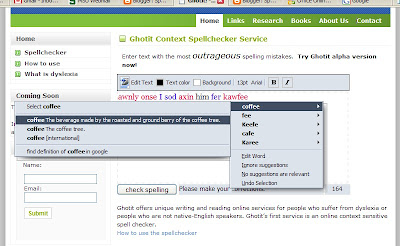

The folks at Ghotit would really like you to test the system out - and to test it out with real students - and to send them feedback. It's a great start, and it will get better the more you help. So bring your students to Ghotit today - and pronounce it "fished" [2] if you want.

-Ira Socol

In Ghotit's own words -


English spelling is not easy and is full of many spelling irregularities. The word GHOTI is a constructed example word used to illustrate these irregularities, since the official pronunciation of the word is counter-intuitive and is pronounced like the word “fish”.

Ghotit was founded by people that suffer from dyslexia. Ghotit’s mission is to improve the overall quality of life of a dyslectic. Ghotit is not a treatment for dyslexia. It's a set of services that assists dyslectics to overcome their writing and reading difficulties by helping the dyslectic to convert his poorly spelled written limitations to mainstream English.

Dyslexics are heavy users of spell checkers. However, standard spell and grammar checkers address the needs of the general population, who demonstrates average spelling and whose spelling mistakes are typing errors resulting in a spelling that shows high resemblance to the requested word. These spell checkers produce low results for users who demonstrate poor English spelling such as dyslectics, due to:
  • The written word spelling is ‘too far’ from the correct spelling
  • No support for misused/out-of-context words- the written word is a real-word that is spelled correctly but is used in the wrong context; for example: let’s meat later
  • No assistance provided to the user in selecting the correct candidate word

Focusing on the problems listed above, the Ghotit team has developed unique spellchecking and spellcorrecting algorithms which are at the core of the services Ghotit is developing for the dyslexic community.

[1] Ghoti is a constructed example used to illustrate irregularities in English spelling. It is a respelling of the word fish, and like it is pronounced /ˈfɪʃ/. It has,

  • gh, pronounced /f/ as in laugh /læf/;
  • o, pronounced /ɪ/ as in women /ˈwɪmɪn/; and
  • ti, pronounced /ʃ/ as in nation /ˈneɪʃən/. - from Wikipedia
[2] With the last t in "ghotit" pronounced the "North American Way" - that is, as an "almost" d - "ghotit" is pronounced "fished"

The Drool Room by Ira David Socol, a novel in stories that has - as at least one focus - life within "Special Education in America" - is now available from the River Foyle Press through lulu.com

US $16.00 on Amazon

US $16.00 direct via lulu.com

Look Inside This Book